
Wicket
A control plane for servers: it provisions a host, then runs its DNS, HTTPS, sign-in, mail, backups and apps. Every change goes through its command line, its API or its admin console.
Pre-alphaNixOS, on Hetzner Cloud or your own machineNo public releasesManual
Goals
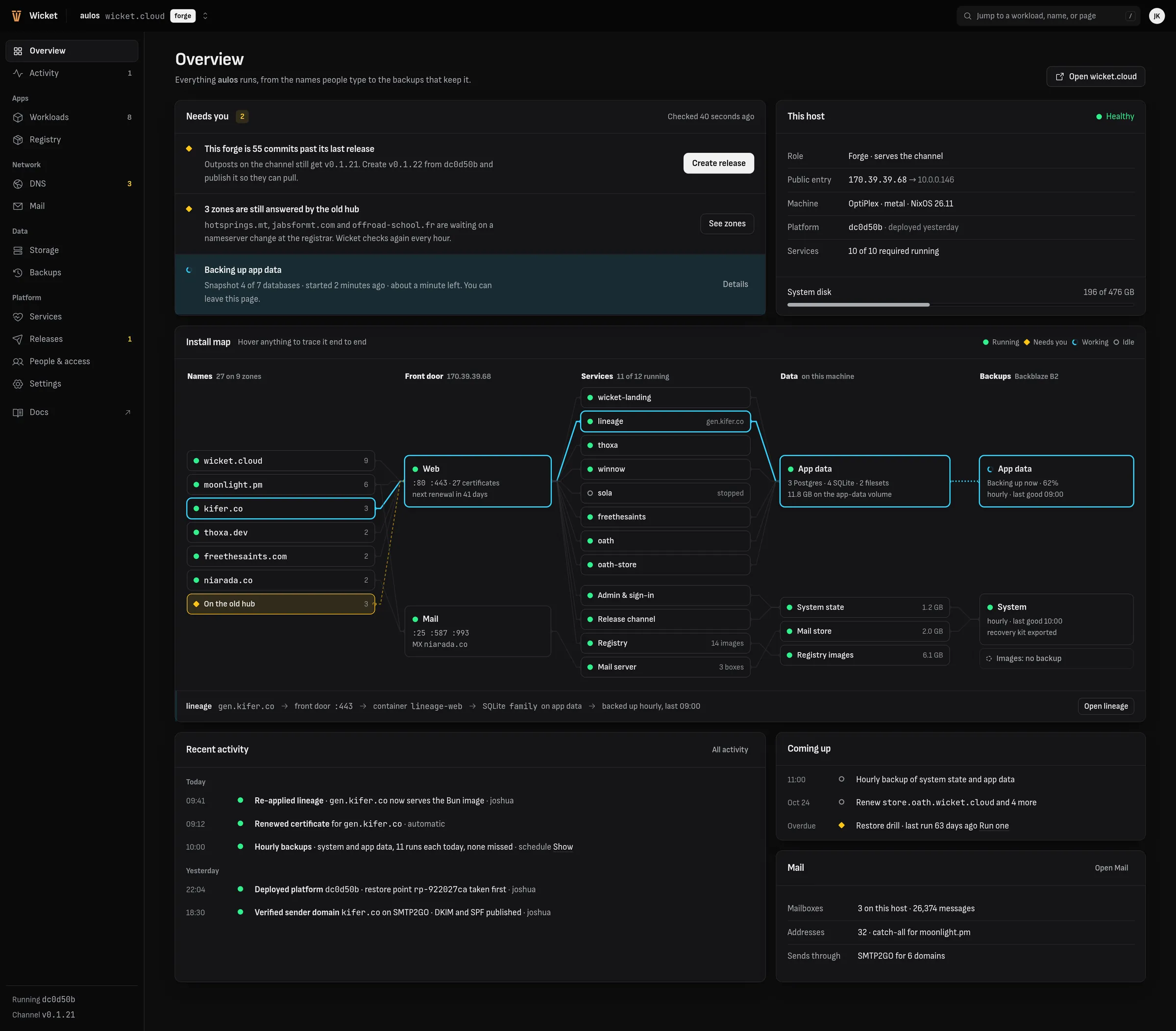
Operations first. Deployment, health, backup and recovery come before features. Every service has a readiness check, every path that changes has an owner and a backup, and restoring onto a fresh machine is an ordinary, tested workflow.
One way in. Operators talk to Wicket, never to the daemons underneath or to a cloud console. wicketctl, the API and the admin console are three faces of the same contracts, and every install serves the documentation for the version it runs.
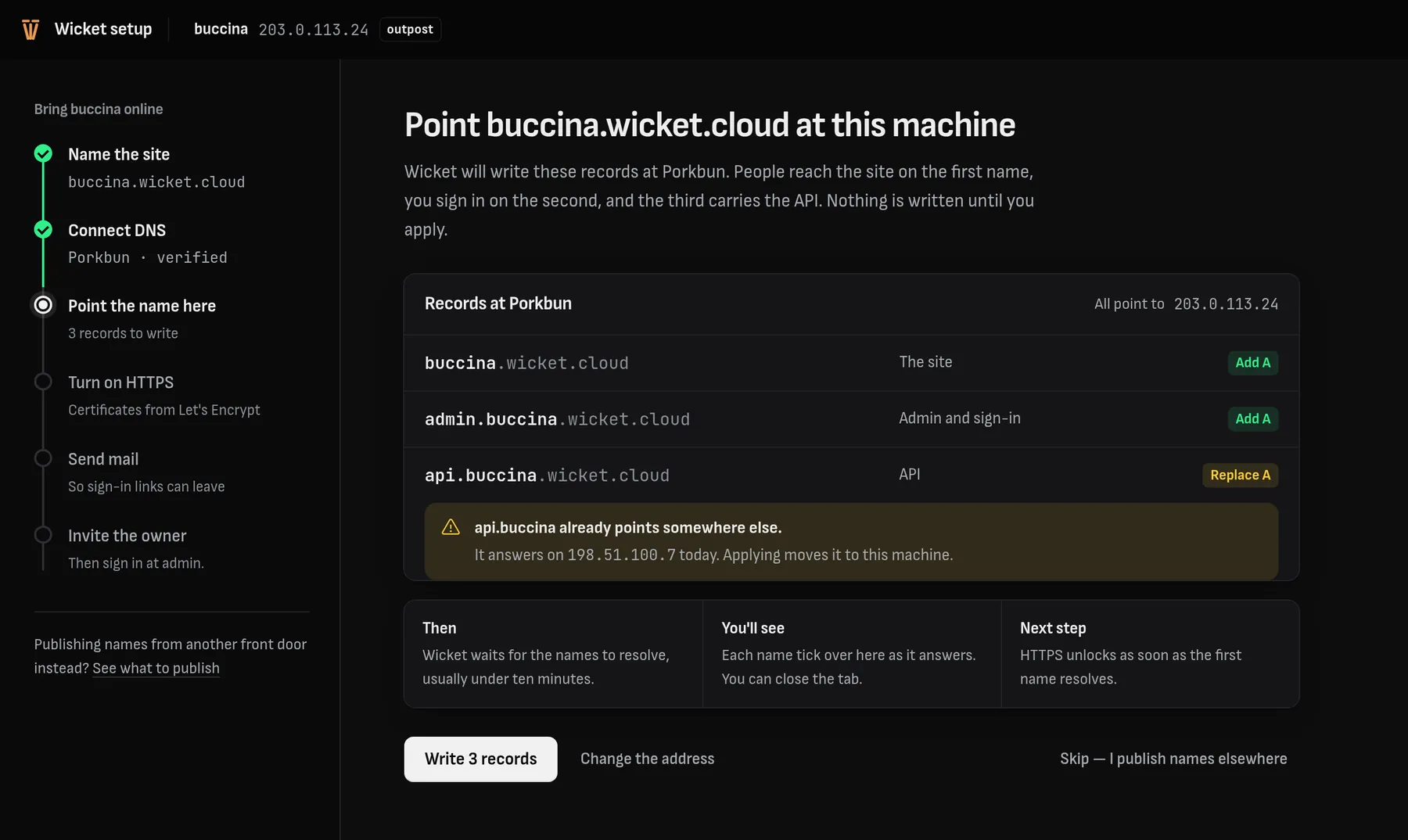
It does the setup itself. When Wicket holds a credential that can do a step, it does the step. It publishes DNS records through the connected provider, verifies the mail domain with the sending service and turns on HTTPS, instead of handing you records to paste somewhere else.
Upgrades keep it running. A forge builds and publishes releases; outposts pull them and apply them. Applying a release restarts the control plane and repairs whatever the new version needs, so a healthy install never needs a hand edit to stay up. A deploy takes a restore point first, and wicketctl rollback returns to it.
Secrets stay where they belong. Keys and passwords live on the host and on the operator's machine, never in a repository or in an API response. The admin console shows a secret's name, not its value.
Rust on NixOS. The control plane is Rust. The host runs NixOS from a flake that Wicket generates, so a machine is rebuilt from its description, and its data comes back from its backups.
What runs on a host
An install is one host. These are its parts, and the one program that runs on the operator's computer instead.
| Part | What it does |
|---|---|
wicketctloperator's computer | The command line. It installs and deploys hosts, pushes updates, and reaches everything below over SSH. |
wicketd | The control API. It plans and applies changes, runs long jobs, and keeps the front door, mail and LAN DNS in step with what you asked for. It listens on the machine only. |
wicket-admin | The admin console, at admin. under the site's own name. |
wicket-idp | Sign-in: an OpenID Connect provider with passkeys and emailed links, and a realm of its own for any app that wants its own users. |
wicket-setup | The first-boot coach. It answers only on the machine itself, through an SSH tunnel. |
| Caddy | The front door: HTTPS for every name, from a configuration Wicket writes and validates before each reload. |
| Podman | Containers for workloads, run without root, and the registry that holds their images. |
| PostgreSQL | The platform's database and the mail index, dumped with every backup. |
| Stalwart | Mail: SMTP, submission and IMAP. |
| restic | Hourly encrypted snapshots of system state and app data, to Backblaze B2. |
| Blocky | Optional: DNS for the local network, with ad blocking and short names for its devices. |
What works today
- Install
wicketctl installcreates a Hetzner Cloud server with a floating IP and volumes, or installs NixOS over SSH onto a machine you already have. The setup coach then names the site, connects DNS, turns on HTTPS, sets up mail and invites the owner.- DNS
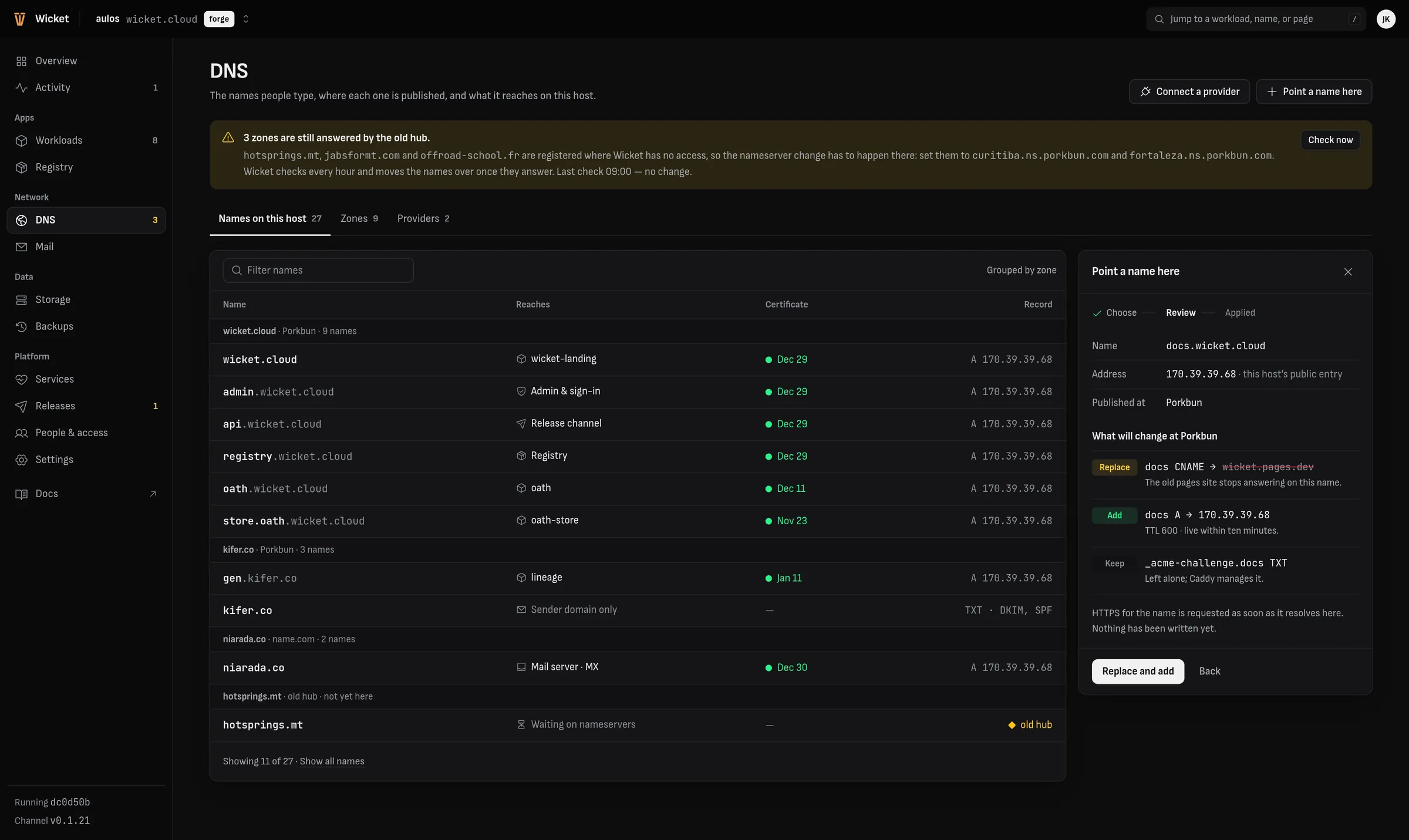
- Porkbun, name.com and Cloudflare. Wicket points names at the host and publishes the records HTTPS and mail need, and shows each change before it makes it.
- HTTPS
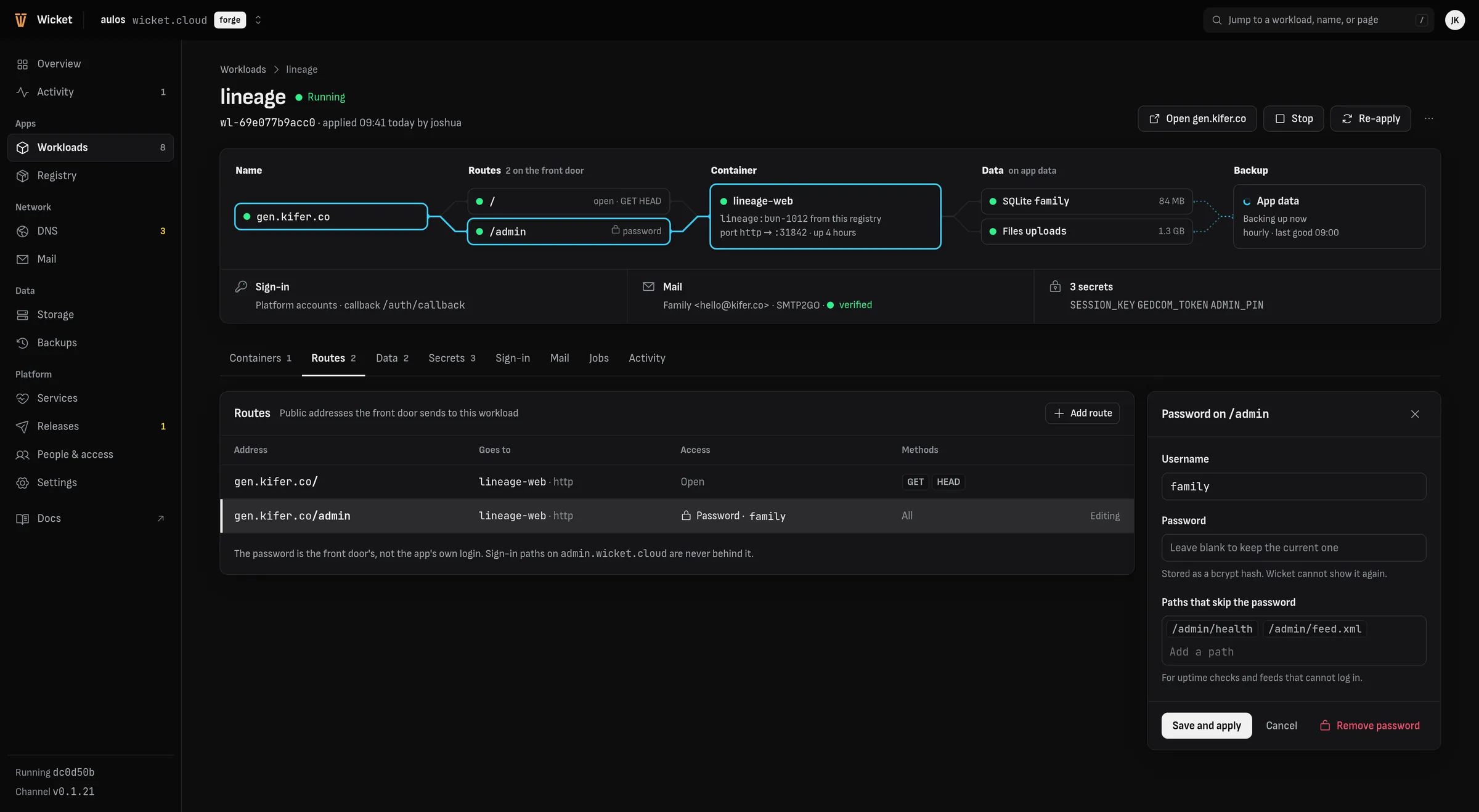
- Certificates from Let's Encrypt for every name the front door serves, renewed on their own. A route can sit behind a site password.
- Sign-in
- Passkeys and emailed links for the people who run the install, and OpenID Connect clients for apps.
- Workloads
- Containers with public routes, SQLite and Postgres databases, file sets, secrets and a sign-in client, described in a TOML file or edited in the admin console. Images come from the install's own registry or are built on the host.
- Stalwart serves mailboxes over IMAP and submission. Aliases, forwards and per-account junk rules are set in the admin console. Outbound mail goes through Resend, SMTP2GO or straight out.
- Backups
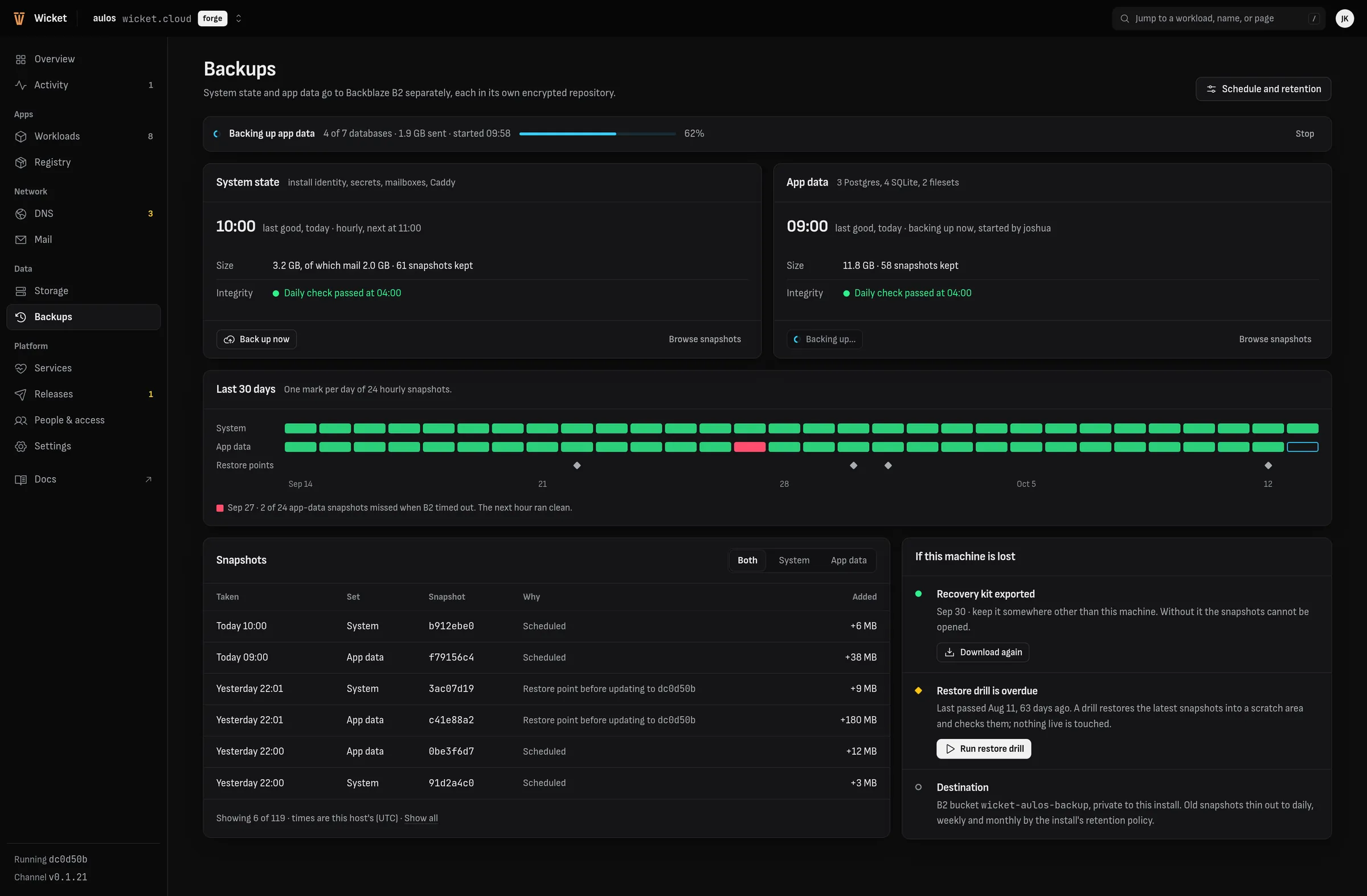
- Hourly encrypted snapshots to Backblaze B2, a daily integrity check, restore drills, a recovery kit, and recovery onto a replacement machine.
- Releases
- A forge publishes releases on its channel. Outposts pull them and can apply them on their own.
wicketctl rollbackreturns the platform to a restore point. - LAN DNS
- Optional: a resolver for the local network with ad blocking and short names for its devices.
- Docs
- Every install serves the manual for the version it runs, in the admin console and from
wicketctl docs.
The admin console
Every page reads from the same API as the command line. These are from the design, with sample data.
A workload file
This site is a workload. Its whole description is the file below; wicketctl workload apply makes the install match it, and the admin console shows and edits the same thing.
# wicket.moonlight.pm: the product page and the manual (site/).
# Apply: wicketctl workload apply <install> --file site/workload.toml --confirm
#
# The id is the one the old marketing site had; the site moved here and
# keeps it. wicket.cloud, its first address, answers with a redirect to
# wicket.moonlight.pm (CANONICAL in src/main.rs).

schema = "wicket.workload/v0"

[workload]
id = "wl-183c1865ee72"
name = "wicket-site"

[[containers]]
name = "web"
image = "registry.wicket.cloud/wicket-site:latest"
ports = [{ name = "http" }]

[[routes]]
host = "wicket.moonlight.pm"
container = "web"
port = "http"

[[routes]]
host = "wicket.cloud"
container = "web"
port = "http"

# The old site's announcement sign-ups. The page no longer asks for them;
# the database stays so they are kept.
[[databases]]
id = "db-456ba297aa28"
name = "leads"
container = "web"
Building and deploying it takes three commands:
podman build -f site/Containerfile --ignorefile site/.containerignore \
  -t wicket-site:latest .
wicketctl registry push <install> --image wicket-site:latest
wicketctl workload apply <install> --file site/workload.toml --confirm
Status
Wicket is pre-alpha. There are no public releases, and the source is not public yet. Not there yet:
- Public releases, and an install anyone can run from them.
- More than one machine in an install.
- Finer permissions for teams of operators.
- Creating mail accounts and setting their passwords from the admin console.
- An automated run on a fresh machine for every release.
The manual covers what works today in detail.