The Wicket manual
How the system works today: shipped behavior, not plans. It is the operator wiki that every install serves in its admin console and from wicketctl docs, taken from the commit this site was built from.
1Architecture§
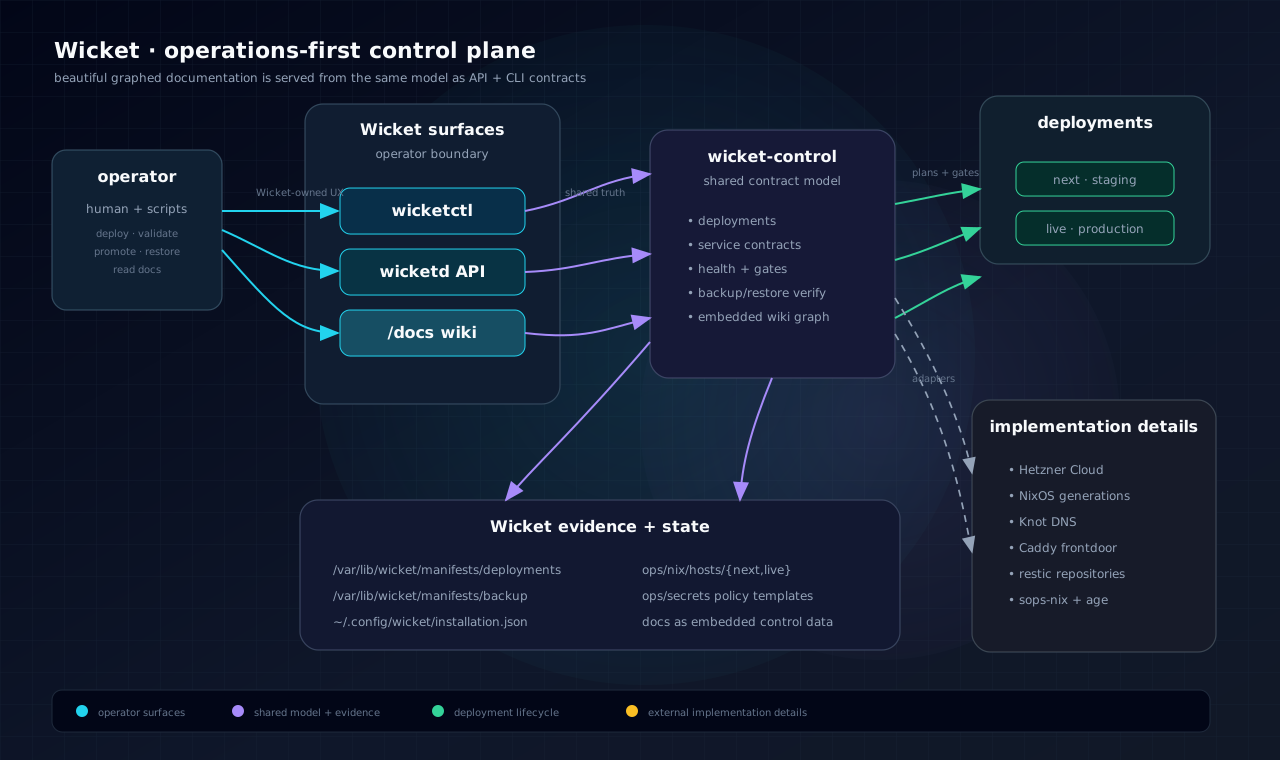
Wicket's architecture is deliberately narrow at the operator boundary and broad behind it:
wicket-controlowns the stable model, contracts, docs, JSON renderers, and human-readable reports.wicketdserves the operator-local web/API control surface.wicketctlprovides the scriptable operator CLI.- External daemons and providers are implementation details behind Wicket-owned contracts.
1.1Mental model§
The project is a small Rust workspace wrapped around a much larger operations contract. Wicket does not try to replace excellent infrastructure daemons. It instead owns the operator experience and the control contract for each service.
The most important architectural rule is:
If an operator needs to inspect, plan, validate, update, back up, restore, recover, cut a release, or configure something, that operation should appear through Wicket.
That means wicketd, wicketctl, and the shared model in wicket-control are
not convenience wrappers. They are the product boundary.
1.2Data flow§
wicket-controldefines the deployment model, service contracts, health reports, plans, and documentation.wicketdserves that model over local/operator HTTP.wicketctlrenders either local model data or remotewicketdresponses.- Mutating operations are guarded by explicit confirmation flags and deployment-specific preconditions.
1.3Current real services§
Wicket operates these areas on a working install (what this wiki covers):
- deployment planning, gates, and host lifecycle (forge/outpost install),
- DNS (authority + third-party providers) and HTTP/TLS frontdoor,
- secrets health,
- Hetzner discovery and provisioning,
- L1 (and when enabled, L2) backup, restore drill, and replacement-host recover
(per-install B2 bucket and app-data volume when multi-install); restore
points before deploy/update/channel apply;
wicketctl rollbackrestores that pair (not the latest backup), - day-2 admin and sign-in (OIDC),
- operator workloads (OCI containers from the on-box registry only in v0,
host+path routes on the HTTPS frontdoor (optional site password); optional SQLite and filesets on L2
and secrets L1→env; optional OIDC (
[[oidc]]/--oidc) at this install’s identity service (platform realm by default;[realm]opt-in); CLI ensure/list/stop/delete/rename/apply/export +workload dblist/query/shell/import (SQLite and Postgres;query --file; empty Postgres import;--overwritedrops and recreates); create-time--seed/--fileset-fromon ensure/apply;workload files put|get|list(--stopor refuse if running for SQLite); named ports assigned ($PORT); admin Workloads editor picks images from the registry catalog; filesets are named L2 folders mounted read-write withWICKET_FILESET_*; Sign-in tab shows IdP clients; Databases/Filesets Browse; dedicated Clients page), - on-box registry when explicitly enabled (
registry.<site>, auth required;wicketctl registry enable/login/images/delete/load/push; blobs on this machine unless moved to a separate B2 bucket), - optional object storage for registry blobs (B2 copy-then-switch, or Hetzner Console S3 keys + ensure; provider durability only),
- legacy container name bindings when configured,
- control-plane update, observed-only release cut, public-entry (required FIP + DNS/TLS, IPv4-only).
If a page describes a capability, it is available in product form unless the page states a limit. Engineering backlog and unfinished designs are not listed here.
See Control Surfaces, Deployments, DNS and Frontdoor, and Backup and Restore for the operational contracts behind those surfaces.
2Control Surfaces§
Wicket's hard rule:
Operators interact with Wicket through Wicket-owned web, API, and CLI surfaces. External daemons and cloud resources are implementation details behind Wicket control contracts.
This produces three public operator surfaces:
- web — human-first control surface for install health, backup, recovery, DNS/HTTPS setup, and day-2 admin.
- API — machine contract used by automation, the web surface, and tests.
- CLI — local and remote operator workflow through
wicketctl.
2.1Why this matters§
Without this rule, every backend leaks its own vocabulary and failure mode: Hetzner for servers, Knot for DNS, Caddy for the frontdoor, restic for backups, sops-nix for secrets, systemd for service state, and NixOS for generations.
Wicket turns those into Wicket concepts:
- installs (forge / outpost),
- public entry (required floating IP + DNS + TLS),
- gates and readiness,
- DNS intent and frontdoor routes,
- backup coverage and restore drills,
- secret handles,
- releases (create / publish / pull / apply — observed-only claims today),
- on-box container registry (explicit enable; auth only),
- L3 object storage for registry blobs (optional; local disk is the default),
- workloads (containers + host/path routes on the HTTPS frontdoor),
- outbound mail (install Mail page vs a workload’s own sending domain),
- recovery kit and replacement-host recover.
Day-2 CLI examples (install name when more than one install is registered):
Day-2 admin (after sign-in on admin.<site>):
The left rail groups the console: Overview and Activity; Apps
(Workloads, Registry); Network (DNS, Mail); Data (Storage, Backups);
Platform (Services, Releases, People & access, Settings); then Docs.
Press / or Ctrl-K to jump to any page, workload or name. The console uses
the full width of the window and folds the rail into a menu on a phone.
Saves run in the background: the button shows it is working, the page stays
usable, and the result lands in place with a short message. A destructive
button asks once, in place (“Click again to …”), instead of a dialog.
Activity lists jobs, backups, restore points, releases and invites,
newest first, grouped by day in your own time zone; running jobs and their
logs are under its Jobs tab.
- Storage — this machine’s live disk use (
dfof real filesystems); L0–L4 overview (L1/L2 Size matches thatdf, not an enable-time default); enable L2 (Hetzner cloud volume, or a btrfs quota on metal — the app-data path is mounted at install, unused until Enable); optional registry B2 bucket (separate from Backups) - Registry — Images live on (this machine or B2); enable / re-apply /
disable; image list + delete (unused tags); Move copies then switches
stores (re-apply does not). Push from this machine:
wicketctl registry load(docker-archive) thenpush(local Podman →registry.<site>). Do not SSH to the host and push to loopback. - People & access — who can sign in to run this install (invite by email, send the link again, remove), and Apps that sign in: identity-service registrations (platform, workload, and extra apps). Workload-owned clients are removed from Workloads → Sign-in.
- Workloads — list; open a workload to edit containers, routes, databases,
filesets, secrets, and Sign-in (tabs + tables); ensure / stop / delete /
rename (operator name only; id and data stay).
The list distinguishes platform sign-in (operators on
admin.<site>) from a workload that has its own member realm. Databases and filesets have Browse (read-only SQL; list/download/upload small files). Prefer this over legacy Containers for new units. Named ports (http) are assigned — the app listens on$PORT. Databases show the injected env (WICKET_DATABASE_*). Filesets are named folders on the app-data volume, mounted read-write (default/wicket/files/<name>, envWICKET_FILESET_*). Adding a container picks an image from this install’s registry (search or choose); you can still type a full ref. Ensure starts the container detached so the host loopback port stays published (pasta/conmon are not killed with the start helper). An image on this install's registry is pulled from loopback and retagged toregistry.<site>before start, even when that tag is already local. Re-pushing:latestand applying or rolling starts the new digest. If that pull fails, the running container is left as it is. Databases:wicketctl workload dblist / query / shell / import for SQLite and Postgres; admin Browse is read-only SELECT on SQLite only. Postgres query/shell use the L2 cluster (psql).query --fileruns a.sqlscript (psql -f);import --fromloads SQL or apg_dump -Fcdump into an empty member (--overwritedrops and recreates — not the default). First create can--seed name=./file.dband--fileset-from name=./fileon ensure/apply (copy if dest missing, before start; ignored later; not in TOML). Fileset copy:wicketctl workload files put|get|list. SQLite import and put refuse if the workload is running unless you pass--stop(same asworkload stop). Postgres SQL does not need--stop. Files arewicket:wicketon the app-data volume. Admin fileset Browse lists, downloads, and uploads files up to 2 MiB (stop first if the workload is running). Larger copies stay on the CLI. A route can take a site password (browser prompt before the app). That is HTTP Basic Auth on the frontdoor, not the app’s own login — useful for a development hostname you do not want the public to open. On a member-identity ([realm]) host, the prompt is only for the app; sign-in and OpenID paths stay reachable without it. Extra public prefixes (open paths) skip the prompt too — Workloads → Routes lock drawer,basic_auth_skipin pack TOML, orworkload protect --skip /path. Set the password on Workloads → Routes (lock control) orwicketctl workload protect <install> --name <workload> --host <host> --user preview --password SECRET. Remove with Remove password orworkload unprotect. Apply may setbasic_auth_passwordin TOML (hashed on the host immediately). Export writesbasic_auth_useronly. A roll that omits the password keeps the stored hash;unprotectis how you drop the gate. - Legacy containers (linked from Workloads) — single-container ensure + name bind from before workloads (still available).
Day-2 host state must stay owned by user wicket (volume root
wicket:wicket 0750; private files via atomic write with chown in the same
call). That includes overlay binaries under /var/lib/wicket/bin, cloud token
under operator-secrets/, L2 spool appdata-volume/, ACME trees under
frontdoor/data, and rootless Podman HOME bits under .local / .local/share
(not the containers storage graph). Channel apply, wicketctl update, and
wicketctl deploy run post-apply heal (full-tree ownership with a small
denylist, frontdoor, IdP, workload re-ensure). Re-applying a workload does not
conflict with its own published routes. If an older root op left files
unreadable, break-glass on the host as root:
wicketd heal-state-ownership
wicketd post-apply-heal
Normal product paths should not need those after a current update or deploy.
CLI (install name when more than one install is registered):
wicketctl object-store status|connect|ensure|reattach <name>
wicketctl registry status|images|enable <name>
wicketctl registry delete <name> --image <repo:tag> --confirm
wicketctl registry load <name> --archive winnow.tar --tag winnow:latest
wicketctl registry push <name> --image winnow:latest
wicketctl login <name>
wicketctl workload list <name>
wicketctl workload rename <name> --name <old> --to <new> --confirm
wicketctl workload ensure <name> --name marketing \
  --image registry.<site>/wicket-landing:latest --port http \
  --route <public-site> \
  [--database leads] [--postgres ghost] [--fileset data] [--secret api-token=…] \
  [--seed leads=./leads.db] [--fileset-from data=./google_token.json] \
  [--oidc] [--oidc-redirect /api/auth/callback] --confirm
wicketctl workload apply <name> --file site/workload.toml \
  [--seed leads=./leads.db] [--fileset-from data=./google_token.json] --confirm
wicketctl workload brand <name> --name exit --file idp-brand.css --confirm
wicketctl workload export <name> --name marketing
wicketctl workload stop|delete <name> --name marketing --confirm
wicketctl workload db list <name>
wicketctl workload db query <name> --name marketing --sql 'SELECT * FROM sqlite_master'
wicketctl workload db query <name> --name dev --database app --sql 'SELECT count(*) FROM exit.members'
wicketctl workload db query <name> --name dev --database app --file pack/seed-dev.sql
wicketctl workload files list <name> --name marketing
wicketctl workload files put <name> --name marketing --fileset data --from ./google_token.json --stop --confirm
wicketctl workload db import <name> --name marketing --database leads --from ./leads.db --stop --confirm
wicketctl workload db import <name> --name prod --database app --from ./warehouse.dump --confirm
wicketctl backup restore-points <name>
wicketctl rollback <name> --confirm
wicketctl recover <name> --snapshot ID --confirm
wicketctl workload db shell <name> --name marketing
wicketctl workload files get <name> --name marketing --fileset data --file google_token.json
Registry blobs default to this machine. That is a first-class store.
Optional off-host is a separate Backblaze B2 bucket
(wicket-<install>-container-registry — not the Backups bucket). From
Registry, Move copies every file, verifies sizes, then switches; the
old copy is never deleted. Re-apply does not change stores.
When first-run skips DNS or HTTPS, this host does not publish
registry.<site>. On the other front door, add the A record, terminate TLS
there, and reverse-proxy that Host name to this host’s HTTP :80. Wicket
says so on enable and on the Registry page.
Hetzner Cloud can still connect Console S3 keys and ensure a bucket
(wicketctl object-store connect|ensure). After recover, object-store reattach verifies buckets.
Images for workloads come from this install’s registry only (v0). Workloads and
databases have stable ids (wl-…, db-…) used for L1/L2 paths; you use
names on the CLI and admin. SQLite files live on the app data volume (L2).
Postgres members share one L2 cluster with PostGIS (not the platform Postgres on L1).
A workload [realm] is a separate member identity. css_file next to the TOML
is copied onto that realm’s /brand/custom.css. [realm] passkeys = false
keeps that realm magic-link only (passkey endpoints 404). [realm] magic_mail = false
mints sign-in links without sending email. Defaults are on. Appearance still only paints
admin.<site>/login. Day-2: Sign-in tab or wicketctl workload brand.
Wicket injects WICKET_DATABASE_<NAME>=postgres://… with the unix socket at
/wicket/pg. App-data backups dump each Postgres database onto L2; system backups dump
platform Postgres onto L1. Live cluster files are not the backup. Leave the container blank to give every
container on the workload the URL.
Filesets are named L2 directories (apps/workloads/<id>/files/<name>/), in
L2 restic, mounted read-write at /wicket/files/<name> unless you set a
custom mount. Secrets are name only (env is derived, e.g. api-token →
API_TOKEN); material is on L1. Optional [[oidc]] (or --oidc)
registers a confidential sign-in client at this install’s identity
service and injects OIDC_CLIENT_ID / OIDC_CLIENT_SECRET /
OIDC_ISSUER / OIDC_REDIRECT_URI. Default callback
/api/auth/callback; public origin is the first whole-host route.
Desired state can also be declared in a TOML file (wicket.workload/v0)
via apply/export ([[filesets]], [[oidc]]). Day-2 admin Workloads has a
Sign-in tab (client, callback, origin; add/remove). Rename changes
only the operator name (wicketctl workload rename --name <old> --to <new> --confirm, or the name field on the workload page). The wl- id, databases,
secrets, routes, and realm stay. The public site apex has
no platform chrome until a workload route claims it.
2.2Documentation as a surface§
This wiki follows the same rule. The documentation is not a detached publishing
site. It is embedded in wicket-control, served by wicketd, and rendered by
wicketctl docs.
That lets the running system explain itself:
/docs— browsable operator wiki,/api/v1/docs— page index and graph metadata,/api/v1/docs/pages/:slug— page JSON,/api/v1/docs/graph.svg— generated docs graph,wicketctl docs— terminal reader.
See Architecture and Graph.
3Deployments§
Wicket models one install per footprint:
provider: hetzner | hivelocity
project:  wicket
role:     forge | outpost
Topology:
- Forge — full install that runs real ops and creates & serves the release channel.
- Outpost — full install that pulls and applies platform updates from a forge channel.
- Our project forge is canonically
wicket.cloud.
Platform on one install (dev): wicketctl update <name> builds and pushes
control-plane binaries. Multi-install distribution: the release channel
(create → publish on forge → pull → apply on outpost).
On a forge, each successful update can append a draft note for the next
release (auto summary of commits since the last release, plus optional
--notes "what changed"). Several updates between creates are combined into
the Create form Notes field; creating a release clears the draft.
wicketctl update forge --notes "HTTPS channel + outpost pull"
# skip the auto commit summary:
wicketctl update forge --no-generated-notes --notes "hot patch only"
Day-2 admin (forge): Releases (/releases on admin.<site>) lists
releases on this host and on the channel, and can Create, Publish, and
Delete without the CLI. Destructive actions use a second click on the
same button (no browser dialog). Notes on Create default to the accumulated
update draft. Equal-width stacked action buttons.
A release id is always v{semver}+{git} (e.g. v0.1.0+0be49f5). Create
requires a semver and a source git from the last control-plane update
(UPDATE_META). Same binaries twice, or the same version on different code, is
refused.
Day-2 admin (outpost): one Releases table — set the forge channel URL, then Pull (metadata) or Apply. Apply starts a background job (restore point, download, install overlay, heal, restart). Confirm returns immediately; closing the page does not cancel it. Watch the live strip on Releases. Status: available / pulled / running.
Auto-apply is an opt-in on that outpost (off by default). When on, the
host checks the forge about once a minute and applies the latest published
release through the same job only when that cut’s version is newer than
what the host already runs (overlay or last pulled channel version). A
metal deploy or cargo overlay of newer code is not rolled back to an older
channel cut. Manual Apply can still install any pulled id. Auto-apply does
not mean the cut is production-safe. Turn on from Releases or
wicketctl release channel auto-apply <name> --on.
Forge channel URL (public): on a forge with HTTPS, outposts pull from:
https://api.<forge-site>/v1/channel (index),
…/releases/<id>,
…/releases/<id>/artifacts/<name>.
Channel is public on the forge API host only. The site apex is free of
platform chrome (no channel, no admin redirect). Day-2 admin is only on
https://admin.<site>/. Outposts do not serve a channel.
(Configure the outpost channel URL to the forge API origin, e.g.
https://api.wicket.cloud.)
CLI (install name when more than one install is registered):
# forge
wicketctl release create forge --version 0.1.0 [--notes TEXT]
wicketctl release publish forge              # latest → channel
wicketctl release list forge
wicketctl release channel forge              # show channel index on forge

# outpost
wicketctl release channel configure waystation --url https://api.wicket.cloud
wicketctl release channel list waystation
wicketctl release channel pull waystation    # store release metadata
wicketctl release channel apply waystation   # overlay binaries + post-apply heal + restart
wicketctl release channel auto-apply waystation --on   # poll + apply latest
Channel apply is overlay-only (writes under /var/lib/wicket/bin as user
wicket). It always takes a restore point first. From admin, the system
snapshot uses the same root backup helper as Back up now (Postgres is
not readable as wicket). Admin Apply is a host job (channel-apply); the
browser POST only starts it. Socket activation units and other NixOS module
changes need wicketctl deploy <name> once. Apply still runs
wicketd post-apply-heal (day-2 ownership, frontdoor, IdP, workloads).
3.1Host size (CPU / RAM)§
Metal installs have no cloud server type — there is nothing to resize. Day-2 admin hides Change size / Host size on metal.
On Hetzner, to change the cloud server type (e.g. cpx11 → cpx21)
without destroying the install:
wicketctl host status waystation
wicketctl host resize waystation --server-type cpx21              # plan
wicketctl host resize waystation --server-type cpx21 --confirm-billable
Order is fixed: offline (stop workloads / registry writes, 503 on public workload hosts) → final L1 backup (and L2 when app-data backups are configured) → power off → change type (keep root disk size by default) → power on → online (re-ensure workloads).
- Apply is CLI-only on the operator machine (the guest cannot finish power-off → change type).
- Day-2 admin Install explains the process and shows these commands (Hetzner only).
- Overview → Host shows this machine’s hostname, role, provider, and addresses. Cloud: SSH primary + public-entry FIP. Metal: one host IPv4 (SSH and public entry).
- On Hetzner, floating IP and data volumes stay on the same server. DNS still targets the FIP.
- This is not
wicketctl update(software) orstorage grow(volumes).
If the install is left offline after a failed resize:
wicketctl host online waystation --confirm
Releases stay not production-safe (D1). Auto-apply is a per-outpost opt-in and does not change that claim.
3.2Public entry§
Cloud installs get a required public-entry IPv4 at provision (Hetzner floating IP; Hivelocity tries a VPS secondary IPv4). Public DNS and HTTPS use that address. On Hetzner the server primary IP is for SSH only. Metal uses the host IPv4 for both SSH and public entry. TLS may be terminated on this host, or skipped when another front door already serves HTTPS — day-2 admin treats that skip as healthy, not pending. Install hosts are IPv4-only (IPv6 disabled).
wicketctl public-entry status forge    # name when multi-install
wicketctl public-entry status waystation
wicketctl setup forge                  # first-run tunnel (DNS uses FIP)
wicketctl dns repoint forge --confirm  # A records → FIP
wicketctl frontdoor …                  # Caddy / TLS intent
Day-2 admin after site + HTTPS: https://admin.<site>/.
3.3Install readiness§
Day-2 Install / gates summarize this host only. They reflect what you actually configured:
- DNS authority appears only if self-hosted authority is enabled (off by default). Connected DNS provider installs do not show that gate.
- HTTPS readiness follows public site + frontdoor/Caddy evidence, so a working admin HTTPS session is not left as an open gate.
3.4Operator surfaces§
Install from a live Wicket checkout is safe: Wicket copies a filtered
source snapshot into Nix (not Cargo target/ or other build caches) and
runs those Nix jobs at idle disk priority so they cannot freeze the
desktop.
wicketctl installs              # list installs on this operator machine
wicketctl install               # new install (never assumes sole local)
wicketctl install --forge --name forge --provider hetzner
wicketctl install --outpost --name lab --provider hivelocity
# Hivelocity key: WICKET_HIVELOCITY_TOKEN, HIVELOCITY_API_KEY, or ~/.config/wicket/hivelocity-token
# Facility/plan: WICKET_HIVELOCITY_REGION (TPA1) · WICKET_HIVELOCITY_PLAN (vps-2gb or a product id)
wicketctl setup forge           # name required when more than one install
wicketctl setup waystation
wicketctl update forge          # fast control-plane push
wicketctl deploy waystation     # NixOS apply (metal: in-place switch if /etc/NIXOS)
# Metal network is per install: LAN DHCP stays DHCP; colo without DHCP is static by MAC.
wicketctl backup status
wicketctl public-entry
wicketctl destroy --dry-run              # this install only (install-id)
wicketctl destroy forge --keep-backups --yes   # drop host; keep B2 bucket for recover
wicketctl recover forge --confirm              # replacement host + L1/L2 restore
# wicketctl destroy --all-wicket         # every Wicket resource in the project
Day-2 commands omit the name only when exactly one install is registered. With multiple installs, pass the name every time.
3.5Multi-install cloud ownership§
Each install gets its own cloud resources labeled with install-id:
- L1 state volume —
{project}-{name}-state - L2 app data volume —
{project}-{name}-appdata(from resource prefix) - Backup B2 bucket —
{prefix}-backupwhen enabled (not a compute extra)
Enable backups or app data on an outpost never reuses the forge’s bucket or volume. Details: Backup and Restore.
3.6Fresh deploy and setup keys§
After a wipe/redeploy, setup used to re-ask for Porkbun / Resend (and name.com, Cloudflare)
keys every time. The operator machine now caches those credentials under
~/.config/wicket/ (same idea as hcloud-token). Saving them once in setup
fills the cache; the next deploy / update can seed an empty host so setup
skips re-entry. Details: Secrets.
See Architecture, Backup and Restore, and Secrets.
4DNS and Frontdoor§
DNS and the HTTP/TLS frontdoor are how the world reaches this install. Public names point at the install’s required floating IP (not the server primary IP used for SSH). Install hosts are IPv4-only.
4.1DNS (connected provider)§
First-run setup starts with the site name (the public domain for this install). That name is recorded even if you skip DNS and HTTPS. Then you can connect a DNS provider (Porkbun, name.com or Cloudflare — multiple accounts are fine) and point the public site names at the floating IP (cloud) or host IPv4 (metal). If a connected account already has the zone for that name, setup selects it. A domain can show up in two connected accounts, for example registered at Porkbun or name.com with its DNS on Cloudflare. Wicket then looks up the domain's public nameservers and uses the account they belong to: on the DNS page, for mail records, and as setup's starting account. If you pick the other account when pointing a name, the review says so and offers the one that serves the zone. You can skip DNS when you will publish names from another Wicket or by hand. Connecting a provider later does not undo the skip; pointing a name through Wicket does. Skip HTTPS when another front door will terminate TLS.
When you skip HTTPS, this host applies an HTTP-only frontdoor on
:80 (no ACME, nothing on :443). Another Wicket can terminate TLS
and proxy those Host names to http://<lan-ip>:80. The publish sheet
lists the LAN address and stock names. Skip-HTTPS Caddy tells every
workload reverse_proxy (and the registry) that the public client is
HTTPS (X-Forwarded-Proto https) so apps that honor that header do
not 301-loop to https:// on a host that only speaks HTTP.
When DNS is connected, the stock names are:
- apex (
your.domain) — free of platform chrome by default (empty/404 until a workload route claims it); day-2 admin is onadmin., not apex admin.your.domain(day-2 admin and platform sign-in:/login,/authorize)api.your.domain(platform public HTTP under/v1/…; forge release channel)registry.your.domain(only when the on-box registry is enabled)
Stock auth. is retired. Leftover DNS for that name may redirect to
admin sign-in; new point-DNS does not require it. A workload that sets
[realm] also serves sign-in on its public origin (reserved paths first,
then the app).
Switching the provider on the point-hostname step reloads that account’s zones. Before apply, the plan shows current A records on those names (what would be overwritten) and any other record types at the same names that may conflict.
If the domain is registered at name.com but nameservers point elsewhere (or vanity glue still delegates to dead hosts), the plan offers Use name.com nameservers — restores the account’s default name.com NS and clears vanity glue so public DNS and Let’s Encrypt can succeed. After NS change, public resolvers (especially 1.1.1.1) may need a few minutes or a cache purge.
Operator surfaces:
wicketctl setup                    # first-run coach (DNS step uses the FIP)
wicketctl dns repoint              # plan only
wicketctl dns repoint forge --confirm    # publish A records → public-entry FIP
wicketctl public-entry status forge      # apex, primary (SSH), floating IP (DNS/TLS)
Optional overrides:
wicketctl dns repoint --ipv4 ADDRESS --confirm
Authoritative DNS (self-hosted zone authority, e.g. Knot) is an optional feature and is off by default. Day-to-day installs use a connected registrar or DNS API (Porkbun, name.com, …) instead of pasting records or running Wicket as the nameserver. When authority is off, install readiness does not list a DNS-authority gate. When you turn it on later, zone intent / validate surfaces and the authority readiness gate apply.
4.2LAN DNS (ad blocking)§
The host can be the local network's DNS server: a caching resolver that blocks ads, trackers and anything else on its blocklists. It answers only clients on private networks (10/8, 172.16/12, 192.168/16) and is not authoritative for any domain.
wicketctl lan-dns apply <install> --deny https://big.oisd.nl/ --allow discord.com
wicketctl lan-dns apply <install> --from-v1-db <V1 wicket.db>
wicketctl lan-dns apply <install> --remove discord.com
wicketctl lan-dns show <install>
apply adds to what the host already has: blocklists and allowed domains you
name are added, and --remove takes one off (a blocklist source or an allowed
domain, written as show prints it). --upstream replaces the resolvers
queries are forwarded to; without any, it forwards to 1.1.1.1 and 1.0.0.1.
--replace starts again from empty lists. Blocklists are URLs or files in
hosts or plain-domain format; Blocky downloads them in the background and
again every 24 hours. An allowed domain is never blocked, and neither are its
subdomains. A blocked name answers 0.0.0.0.
Then point the router's DHCP DNS at the host's LAN address.
4.2.1Local names§
Give devices on the network a short name in admin under DNS → Local network (Name a device), or from the operator machine:
wicketctl lan-dns name add <install> nas 10.0.0.50
wicketctl lan-dns name add <install> printer 10.0.0.51 fd00::51
wicketctl lan-dns name remove <install> printer
wicketctl lan-dns name list <install>
A name is one word and answers as itself and under .lan: nas and
nas.lan. Adding a name that exists changes its address. Names win over the
blocklists, and other .lan names answer "no such name" without leaving the
network.
Every device can use nas.lan. To use plain nas everywhere, set the
router's DHCP search domain (sometimes called "domain name") to lan; macOS
and iOS only try the short name with it.
The host's own names answer with its LAN address: every site the front door
serves over HTTPS, mail names included. Local devices then connect straight to
the host instead of going out through the router and back. Without this, the
mail server sees every local device as the router, so one device with a wrong
password can get the whole network blocked. The list follows the front door by
itself (each Caddy reload, and each wicketd start); only exact names are
answered, so other names under the same domain still resolve normally.
4.3Frontdoor (HTTPS)§
Wicket owns routes, upstreams, TLS policy, and the generated Caddy
configuration. Public HTTPS for stock hosts (admin, api, and apex) is
applied from setup (Enable HTTPS) after DNS points at the public entry
(cloud floating IP, or the metal host IPv4). Skip that step when another
front door will terminate TLS.
Workload routes (host and/or path) are published when you ensure a workload —
the frontdoor is re-rendered so ACME covers those names. A route may set a
site password; Caddy then asks for HTTP Basic Auth before proxying to the
container. On a realm host, sign-in and OpenID paths
(/.well-known/openid-configuration, /authorize, /token, /login, …)
stay open so the app can discover and complete login. Other URLs can skip
the password when you list them as open paths on the route (Workloads →
Routes, or basic_auth_skip in the pack TOML — Stripe webhooks, for
example). / still prompts (/ cannot be an open path). Install readiness
treats HTTPS as ready when the public site is set, Caddy is active, and
production ACME / certificate material is present for that site (including
working https://admin.<site>).
Operator surfaces:
wicketctl frontdoor routes
wicketctl frontdoor validate
wicketctl frontdoor render --dry-run
wicketctl frontdoor health
A guarded host apply rewrites the on-host Caddyfile and reloads Caddy for this install:
wicketctl frontdoor apply --confirm-frontdoor-apply
Prefer the setup coach HTTPS step for first configuration. Prefer
wicketctl setup / day-2 admin for ordinary operators.
See Control Surfaces and Deployments.
5Mail§
Outbound sending is Resend or SMTP2GO (API key + sending domain) or an SMTP mailbox. Wicket publishes verification DNS through a connected DNS provider — there is no registrar paste step when DNS is connected. Resend records are SPF, DKIM, and DMARC. SMTP2GO records are the DKIM CNAME and the return-path CNAME (that CNAME is how SPF aligns). Click-tracking CNAMEs are not published.
Credentials stay on the host (mail-providers/*.secret.json). They are never
in a workload TOML file and never in list API responses.
5.1Mailboxes§
Mailboxes are served by Stalwart, a mail server that runs on the host
beside Caddy and Postgres. It receives mail on port 25, takes mail from
clients on 587 (STARTTLS) and serves IMAP on 993. Point a mail client at the
host's mail name (for example niarada.co) on 587 and 993 and sign in with
the mailbox's main address and its password.
- Folders are Inbox, Sent, Drafts, Archive, Junk and Trash, marked so clients find them on their own. Clients can add their own folders.
- Every other address on a mailbox delivers into it, and the mailbox may send as any of them. Sign-in uses the main address only.
- An address of the form
@example.comon a mailbox catches every unknown address at that domain. - A forward-only address is a mailbox with a forwarding rule: it keeps a copy and sends one on, with the forwarding address as the sender, so replies and bounces come back here.
- Spam is scored and filed into Junk. Nothing is refused for spam. Each mailbox has its own junk rules (below).
- Mail from domains verified on the outbound relay (SMTP2GO) leaves through it; other mail is delivered directly and signed with the host's DKIM keys.
- Contacts sync (CardDAV) is at the mail name, for example
https://niarada.co/.well-known/carddav, with the same address and password. Senders in a mailbox's contacts skip the spam filter.
Wicket sets Stalwart up on every start (listeners, certificates, folders, spam settings, relay) and turns Stalwart's own web admin off.
5.2Addresses§
Mail › Addresses, the first Mail tab, has one row per account:
- A Mailbox is read with a mail client. Its mail goes to its Inbox, and to a copy address when it has a forward.
- A Forward only address has no password, so nobody signs in to it. Its mail goes on to the address shown, and Stalwart keeps a copy in its mailbox.
The search box finds an account by any of its addresses. Open shows the account:
- Signs in (or Main address for a forward-only one) is the account's own address. A mail client signs in with it, never with an alias.
- Alias is another address that delivers to the account. Add address takes the name, one of the host's mail domains, and the account. An address belongs to one account only. Remove on its row takes it off.
- Catch-all (
*@example.com) is every address at that domain that is not listed. - Forwards each get a copy of the account's mail. Add forward adds one and Stop ends it. Junk is not forwarded unless the sender is allowed.
Adding or removing accounts, setting passwords and changing a catch-all are not in Wicket yet.
Mail is backed up with the system backup: Stalwart's index is in the
platform Postgres dump and its message files are under /var/lib/stalwart.
5.3Junk filter§
Mail › Junk filter lists every mailbox. Open one to:
- Turn its junk filter on or off. Off means the spam score never moves mail to Junk. Blocked senders still go there.
- Allow or block a sender, by address (
friend@example.com) or by domain (@example.com). An address rule wins over a domain rule. An allowed sender always reaches the Inbox; a blocked one always goes to Junk. - See where each rule came from and remove it.
Rules also come from the mailbox's own mail, about every 30 seconds:
- Moving a message into Junk blocks its sender. Moving it out of Junk allows them. The latest move wins.
- People the mailbox writes to are allowed, unless a rule for them is already there. A block or a Junk move is never replaced this way.
- The mailbox's own addresses are never blocked or allowed.
An allow rule does not apply to a message that fails DMARC, so a forged From of an allowed sender is still scored. A forward-only address does not pass on mail the filter put in Junk, unless the sender is allowed.
Over SSH on the host:
wicketd stalwart junk <address>                  # show the rules
wicketd stalwart junk <address> on|off           # the junk filter
wicketd stalwart junk <address> allow|block|remove <sender>
5.4Inbound, outbound§
These admin pages belong to the retired wicket-mail server. On a host
that runs Stalwart they are empty; forwards are on Addresses and junk
rules on Junk filter.
Inbound lists messages offered to this host, including ones that were refused. Outbound lists relays. A failed send can be tried again from that page.
5.5This install (platform)§
The Mail page is for this install: operator invites, platform-realm magic
sign-in links, and host notifications. From address is composed as
Friendly <local@domain>.
Setup configures this account before the first owner invite.
5.6Workloads§
Each workload can have its own sending domain on Workloads → Mail
(wicketctl workload mail). That account:
- injects the env below into every container after Ensure
- is what
wicket-idpuses to send magic links for that workload’s realm (when[realm]is set), unless that realm turns mail off
It does not replace the install Mail page. Same email on admin and a workload are still two accounts.
A workload with no mail of its own does not send from the install From address. Realm magic links stay in the host journal until that workload’s mail is configured.
To reuse the install credentials instead of a second API key, set:
[mail]
source = "platform"
friendly_name = "Family"   # optional; all three or none
local_part = "hello"
domain = "kifer.co"
or Workloads → Mail → Use install mail, then Save and verify, or
wicketctl workload mail <install> --name <workload> --use-platform --friendly-name Family --local-part hello --domain kifer.co --confirm.
Omit the three From fields to send as the install From. When they are set,
the API key or SMTP password stays the install account, and the From is
this name and address. On Resend or SMTP2GO, Wicket creates the domain if
it is not already on that account and publishes verification DNS through
the DNS provider connected on this install. Ensure still injects WICKET_MAIL_*.
This is opt-in; omitting [mail] does not fall back.
[realm] magic_mail = false (or Sign-in → Don't email sign-in links)
still mints a magic link (POST /provision/users returns
onboarding_link) but does not send Resend or SMTP. The login page
does not claim a message was emailed. The app can also pass
send_mail: false on each provision call. Platform (admin.<site>) mail
is unchanged.
5.6.1Env in the container§
Wicket does not send the app’s mail. The app reads these variables and talks to Resend, SMTP2GO, or SMTP itself.
Always present when mail is configured:
| Variable | Example | Meaning |
|---|---|---|
WICKET_MAIL_KIND | resend, smtp2go, or smtp | Which credential set is filled |
WICKET_MAIL_FROM | EXIT <hello@exitgroup.dev> | From header to use on outbound mail |
WICKET_MAIL_DOMAIN | exitgroup.dev | Sending domain (the part after @) |
When WICKET_MAIL_KIND=resend:
| Variable | Meaning |
|---|---|
RESEND_API_KEY | Resend API key (re_…). Same name the Resend HTTP API / SDKs expect. |
Send with Authorization: Bearer $RESEND_API_KEY to https://api.resend.com/emails,
from = WICKET_MAIL_FROM.
When WICKET_MAIL_KIND=smtp2go:
| Variable | Meaning |
|---|---|
SMTP2GO_API_KEY | SMTP2GO API key (api-…). |
Send with header X-Smtp2go-Api-Key: $SMTP2GO_API_KEY to
https://api.smtp2go.com/v3/email/send. sender = WICKET_MAIL_FROM.
When WICKET_MAIL_KIND=smtp:
| Variable | Meaning |
|---|---|
SMTP_HOST | Submission host |
SMTP_PORT | Port (587 STARTTLS, 465 TLS, …) |
SMTP_USERNAME | AUTH username |
SMTP_PASSWORD | AUTH password |
SMTP_SECURITY | starttls, tls, or none |
Connect to SMTP_HOST:SMTP_PORT, authenticate, send with From =
WICKET_MAIL_FROM.
There is no single WICKET_MAIL_* value. Kind tells you which extra vars
exist. Secrets are only the key/password rows; FROM / DOMAIN / KIND
are not secret.
See Secrets and DNS and Frontdoor.
6Backup and Restore§
Wicket stores encrypted off-host backups. Operators never type repository URLs. Day-2 admin → Backups is the primary enable path.
System (L1) and app data (L2) are two restic repositories in the
same Backblaze B2 bucket. They are not one combined backup. Both run
hourly after they are enabled (app data after the app data volume is on).
Postgres is dumped (pg_dump) into those snapshots; live cluster files are
not the backup. The Backups page lists each set as on/off.
Off-host storage is Backblaze B2 on every compute cloud (Hetzner, Hivelocity, metal). Wicket creates a private bucket and a bucket-scoped key. You never type a repository URL.
- A B2 master application key is normally already on the host after
install/deploy/update from
~/.config/wicket/b2-credentials.json(orWICKET_B2_KEY_ID/WICKET_B2_APPLICATION_KEY, or stockB2_KEY_ID/B2_APPLICATION_KEY). If the page still asks, paste key ID + application key once (stored only on this host). - Confirm Enable system backups — Wicket creates the bucket and takes the first snapshot in the background. The page shows the B2 bucket name it will create (or reuse) before you confirm. The enable card only appears until destination is configured.
- After enable, use Back up now for later snapshots (runs with host privileges so Postgres and other system paths are included). If a required state path is missing on the host, the snapshot refuses rather than claiming coverage it did not get. If another backup or integrity check is already running, wait and retry — Wicket does not force-unlock the repository.
- Download recovery kit from the Recovery card — store the zip in your password manager (or with a trusted colleague). Without it, encrypted backups cannot be unlocked if this host is lost.
- Run restore drill proves a backup can be unlocked without replacing host state.
If this machine was wiped and the same B2 bucket still holds the previous restic repository, Enable will not overwrite those snapshots. Use Start this bucket fresh on the attention card (confirmed) to empty the bucket, initialize a new repository, and take a first snapshot. That deletes the old snapshots — they are only recoverable with the previous install’s recovery kit.
A daily health check that failed because the old repository used a different key is dropped once a later snapshot succeeds. Health then shows pending until the next daily check. Coverage, retention, and restore how-to live behind More detail on the Backups page.
Before Wicket itself changes (deploy, update, channel apply, host
resize) the product takes a restore point: system and app-data snapshots
stamped with the Wicket revision on disk. Rollback uses that point, not the
latest backup (a bad generation can write bad data, then the next hourly
snapshot would capture it). Enable backups before day-2 platform changes —
without a restore point there is nothing to roll back to. On the Backups
page, Last 30 days has a Restore points row with a mark on each day
one was taken, and the snapshot list says which change it came before.
Day-2 admin runs as user wicket. System snapshots run as root so they
can dump platform Postgres (the live datadir is not the restic object). The
CLI path SSHs as root and snapshots directly.
CLI is a power tool. Pass the install name when more than one install is
registered (forge, waystation, …):
wicketctl backup enable waystation                 # plan (no charge)
wicketctl backup enable waystation --confirm-billable
wicketctl backup status waystation
wicketctl backup snapshot waystation --confirm
wicketctl backup enable-l2 waystation --confirm    # app-data restic (after L2 volume)
wicketctl backup restore-points waystation
wicketctl backup recovery-export waystation        # kit named wicket-recovery-waystation-…
wicketctl restore drill waystation --confirm       # scratch extract; does not replace live state
wicketctl restore cutover waystation --confirm     # same-host live-path replace from backup
wicketctl rollback waystation --confirm            # restore data + Wicket from pre-change snapshot
wicketctl recover waystation --snapshot ID --confirm  # replacement host; not latest if a generation went bad
wicketctl storage status waystation
wicketctl storage enable-appdata waystation --confirm-billable
6.1Host lost (replacement recover)§
- Export a recovery kit while the install is healthy (
recovery-export). - Destroy the dead host but keep backup storage (pass the install name
when more than one is registered):
wicketctl destroy forge --keep-backups --yes wicketctl recover forge --confirmprovisions a new host, rebinds the B2 destination (new scoped key), restores the latest L1 backup (or--snapshot IDafter a bad Wicket generation), then L2 when it was enabled. If cutover fails mid-way, re-run recover — Wicket heals backup secrets from.cutover-asidewhen possible.- If L2 app-data was enabled and the volume was destroyed with the host:
wicketctl recover forge --l2-only --confirmrecreates/mounts an empty L2 volume (and restores from L2 restic when those secrets exist). Use--accept-incomplete-tiersonly when you accept missing L2 data.
6.2What enable does§
- Uses the host’s B2 master key to create or reuse a private bucket for this install only, then mints a bucket-scoped application key.
- Installs backup secrets on the host under
/var/lib/wicket/backup-secrets/. - Initializes the restic repository (
s3:) and runs the first verified backup. - Writes destination metadata under
/var/lib/wicket/backup-destinations/. - When enable runs from the operator machine CLI, also writes an offline
recovery kit under
~/.config/wicket/recovery/(admin enable records kit status on the host; re-export from the operator machine when you need an off-server copy).
Multi-install: B2 buckets are named and tagged with this install’s
install-id. Enable reuses only a bucket for this install (e.g.
wicket-waystation-backup). It will not attach another install’s bucket.
If enable fails after secrets are written, retry from admin — Wicket reuses those secrets and finishes destination metadata without creating a second bucket.
Backend tooling and handles are implementation details (see Secrets).
6.3Offline recovery kit§
Encrypted backups cannot be opened without the unlock secret. That secret lives on the host for day-to-day use. For true host-loss recovery, export a plain zip kit and store it off the server (password manager, trusted colleague).
wicketctl backup recovery-export
Or use Download recovery kit on day-2 admin → Backups (same kit).
The zip is not password-protected — treat the file as a secret. Contents:
unlock-password.txt— required to open encrypted backupsrepository.txt— optional handle for the off-host storeREADME.txt/kit-meta.json— non-secret instructions and metadata
Do not store the kit only inside the backup repository it unlocks. Enable also writes a kit automatically when the unlock password is still in memory. Re-export anytime. Day-2 Backups shows whether an export was recorded.
6.4Status and plans§
wicketctl backup plan
wicketctl backup status
wicketctl restore verify
Read-only reports: coverage, retention, secret materialization, latest snapshot, integrity, restore readiness, recovery-kit export attestation — no plaintext secrets in status output.
6.5Restore drill§
Prove a backup can be unlocked and extracted without replacing host state:
wicketctl restore drill              # plan / what will happen
wicketctl restore drill --confirm    # run on this install
The host extracts the latest backup into a scratch directory under
/var/lib/wicket/restore-drills/, checks required paths from that snapshot’s
manifest (not a fixed subset), writes a result under
/var/lib/wicket/manifests/restore/, and removes the extract by default
(use --keep-extract to retain files). Day-2 admin Backups also has
Run restore drill. Concurrent backups wait on a host lock so they do not
race the repository.
This is not a full disaster-recovery rebuild of a replacement host.
6.6Same-host state restore§
Replace product state on this host from a backup without provisioning a new machine:
wicketctl restore cutover              # plan / what will happen
wicketctl restore cutover --confirm    # stop → aside → restore → restart
# optional:
#   --snapshot <id>     # default: latest backup
#   --purge-aside       # remove pre-restore aside after success (default: outpost)
Wicket stops product services, moves current state under
/var/lib/wicket/.cutover-aside/<stamp>/, restores the backup into place,
restarts services, checks loopback health, and records a result. Pre-restore
state is kept for rollback unless --purge-aside is set.
This is not replacement-host DR (no new server, no DNS move). For a lost host, use recover below.
6.7Replacement-host recovery§
When this install’s host is gone (you destroy it, or it is unreachable), rebuild from the offline recovery kit + encrypted backups:
wicketctl destroy forge --keep-backups --yes   # this install only; keep B2 bucket
wicketctl recover forge                        # plan + refuse if host still healthy
wicketctl recover forge --confirm              # provision if needed, re-bind storage, restore L1
On metal, recover uses the recorded host IPv4 (SSH with the deploy key).
It never creates a cloud server. A live metal host (L1 backup secrets
present and the control plane answering) is refused — use restore cutover.
A freshly reinstalled host has an empty L1; setup coach running is not
enough to refuse. Lost host: reinstall first
(wicketctl install --provider metal --name N --host IPv4), then
wicketctl recover N --confirm. App-data on metal is the local btrfs
volume. After a wipe, recover creates @appdata if it is missing
(same as Storage Enable), then restores from the L2 backup.
recover --l2-only is for a live host whose L1 is already in place.
Image blobs in the on-box registry (this-machine store) are not in
restic. After a disk wipe they are gone unless you moved them to the
optional B2 registry bucket first. Re-push images, then
wicketctl workload re-ensure-all N --confirm if containers cannot pull.
Recover restores L1 platform state (system volume + platform Postgres), then
L2 when it was enabled: reattach an existing app-data volume, or create an
empty volume and restore from the L2 backup repository (L2 unlock material is
restored with L1 under backup-secrets). When L3 object storage was configured,
it reattaches credentials restored with L1, re-ensures provider buckets
(blobs stay at the provider — no restic of L3), and re-enables the on-box
registry when it was enabled so containers keep pulling from the same bucket.
It then re-ensures workloads from restored desired state. If L2 cannot be
restored, recover finishes incomplete unless you pass
--accept-incomplete-tiers.
Defaults:
- Newest kit under
~/.config/wicket/recovery/ - Optional
--kit PATHto pick another zip - Preflight refuses when the host is still healthy (use
restore cutoverinstead) - Does not destroy cloud resources by itself
- Re-binds the B2 destination (new scoped key) from the kit repository URL
- Restores the latest L1 backup, then checks loopback health
After success, re-point public DNS if the IPv4 changed, re-export a recovery kit, and run a restore drill when ready.
6.8Schedule§
Host policy enables timers for this install (unit names include the internal deployment slot; operators use CLI/admin, not unit names):
| Job | Cadence |
|---|---|
| System snapshot | Hourly (±10 min) — includes platform Postgres dumps |
| App-data snapshot | Hourly (±20 min; staggered from system) — includes workload Postgres dumps |
| Integrity | Daily (system ±1 h; app data ±2 h) |
| Retention | Weekly (system and app data are separate timers) |
Snapshots store data only (content-addressed / incremental). Full repository integrity is daily. Alerts email owner/admins through the install’s mail provider when configured.
wicketctl backup alerts    # recipients, sender, cadence; sends nothing
wicketctl backup retention # policy + last run
wicketctl backup retention --confirm  # apply now
6.9State volumes§
Defaults by install role (see Deployments):
forge   L1 ≈ 100 GiB
outpost L1 ≈ 10 GiB
Provider inventory is display truth when available.
See Deployments and design
docs/specs/2026-07-25-backup-destination-and-recovery.md.
7Secrets§
Wicket’s secret model is handles, not plaintext values. Operators and normal CLI/API output never print secret material.
Day-2 backup secrets live on the host under controlled paths (for example
/var/lib/wicket/backup-secrets/). The offline recovery kit holds unlock
material for host-loss recovery — store that zip off the server (password
manager or trusted colleague).
7.1Operator machine caches (mode 0600)§
On the machine where you run wicketctl, Wicket may keep small credential
caches under ~/.config/wicket/ so a fresh deploy does not force you to
re-paste every third-party key during setup:
| File | Used for |
|---|---|
hcloud-token | Hetzner Cloud API (install / deploy / update; L2 volumes) |
b2-credentials.json | Backblaze B2 master application key (day-2 backups) |
hivelocity-token | Hivelocity API (install / deploy when provider is hivelocity) |
porkbun-credentials.json | Porkbun DNS in setup |
namecom-credentials.json | name.com DNS in setup |
cloudflare-credentials.json | Cloudflare DNS (API token) in setup |
resend-credentials.json | Resend outbound mail in setup |
| SMTP mailbox and SMTP2GO | Host-only (mail-providers/*.secret.json). No operator-machine cache. Platform and per-workload rows share the index (owner). |
- Write: after you save DNS/mail in setup,
wicketctl setup(while the tunnel is open) andwicketctl updatepull host secrets into these files. - Read:
wicketctl install/deployandwicketctl updateseed an empty host from the operator cache: Hetzner token under hostoperator-secrets/(so Backups does not re-ask), plus DNS/mail so setup can show those steps as already connected.
Never commit these files. They are operator-machine state only (same rule as deploy keys).
7.2Operator surfaces§
wicketctl secrets catalog
wicketctl secrets doctor
wicketctl backup recovery-export
secrets doctor reports this install. Optional --deployment host is
accepted for scripts; omit the flag for ordinary use. Day-2 backup secrets are
what matter for recovery.
These surfaces answer:
- which secret handles the product expects,
- whether encrypted policy and age recipients are structurally present,
- whether runtime materialization looks possible on this host,
- whether a recovery kit has been exported for this install.
7.3What you should never do§
- Commit tokens, private keys, or password files to git.
- Leave the only copy of a recovery kit on the production host.
- Paste restic passwords into chat or email.
See Backup and Restore and Deployments.